How to find backlink opportunities with an AI assistant and MCP
A practical workflow for using Claude, Cursor or another MCP-capable AI to find, vet and track backlink opportunities, while you approve every decision.
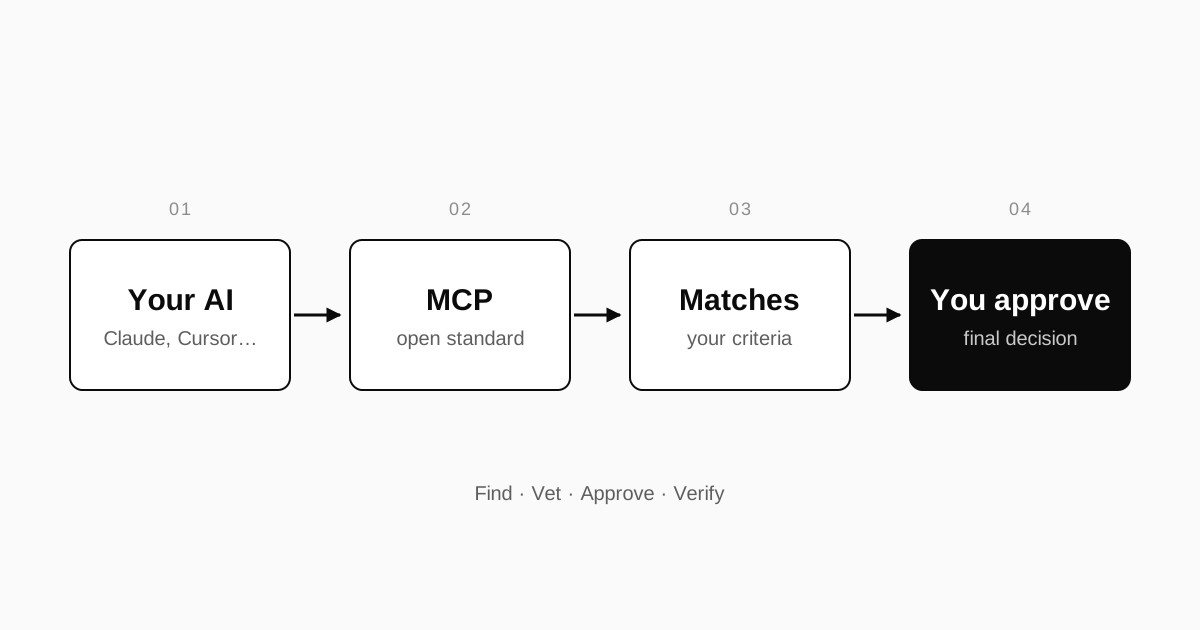
Finding backlink opportunities is mostly legwork. You search for relevant sites, read their pages, work out whether a link would make sense, find out who to talk to, and track it all in a spreadsheet that goes stale within a week. It is exactly the kind of work people now hand to an AI assistant, and exactly the kind of work where a chat window on its own falls short.
This guide walks through a workflow that uses an AI assistant connected over MCP to do the searching and the bookkeeping, while you keep the decisions.
Why a chatbot on its own is a weak prospecting tool
Ask a general-purpose assistant for "sites that would link to my bakery equipment shop" and you will get a confident list. Some of those sites will be real and relevant. Some will be real and irrelevant. Some may not exist, and any metrics quoted alongside them have no source you can check.
The underlying problem is access, not intelligence. A model answering from its training data does not know which sites are active today, which site owners are open to working with you, or what you have already agreed with whom. Web search helps a little, but a page of search results is not a list of people who want to exchange links with you. The assistant has nothing real to act on and nowhere to record the outcome.
What MCP changes
The Model Context Protocol (MCP) is an open standard for connecting AI assistants to outside tools and data. Anthropic introduced it in November 2024, and the project's own documentation describes it as "an open-source standard for connecting AI applications to external systems", comparing it to a USB-C port for AI applications.
In practice, an MCP server exposes tools that an AI client can call: search this data, create this record, check this status. The client is the application you already work in. Claude, Cursor, GitHub Copilot, Gemini and Windsurf are among the AI tools that can connect to MCP servers.
For link building, that means your assistant can work with real information instead of guessing: for example, a network of site owners who want to exchange links, your own sites and criteria, and the current state of each deal. The assistant does the reading and the admin. You still decide.
Before you start: write down your criteria
The quality of what your assistant finds depends almost entirely on how clearly you describe what you want. Write it down once, in plain language, and reuse it every time.
Your sites
For each site, note the domain, what it covers, who reads it, and which pages you would most like links to. Be specific. "Home and garden" is too broad to filter anything. "Small-space vegetable growing for renters" is useful.
Your link criteria
A short brief is enough. For example:
Site: our bakery equipment shop
Topics we want links from: baking, cafés, small food businesses
Pages we want links to: buying guides, maintenance guides
Links we will give: from our guides, only where the partner page helps readers
Anchor text: brand name or a natural phrase, never exact-match keywords
Exclude: gambling, payday loans, adult, pages that exist to list "partner" links
Pace: a few new exchanges a month at most
The exclusions and the pace matter as much as the topics. Google's spam policies name "excessive link exchanges" as an example of link spam, so a brief that caps volume and insists on relevance is doing risk management, not just filtering. If you have not read the policy, what Google's spam policies actually say is a five-minute summary.
A workflow that works
1. Connect your assistant to a real source of opportunities
Add an MCP server that gives the assistant something real to search, using your AI client's MCP settings. Each client has its own place for this, so follow the server's instructions for the tool you use. Once connected, the server's tools appear in the assistant's list of available tools, and you can ask it what they do.
2. Ask for candidates against your brief
Give the assistant your criteria and ask for a shortlist rather than a verdict:
Using my criteria for the bakery equipment shop, find up to ten sites
that match. For each one, tell me which page a link to us would sit on,
which of our pages it would point to, why a reader of that page would
care, and what we would be expected to give in return.
Asking for the specific page and the reason forces the assistant to reason about relevance at page level, which is the level that matters.
3. Make it show its working
For each candidate you want facts you can check, not adjectives. Where did the candidate come from? What exactly is proposed on each side? If a number appears, which tool produced it? A good answer lets you verify a candidate in a couple of minutes. A candidate you cannot verify goes to the bottom of the list.
4. Vet the shortlist yourself
This is the step never to skip. Open the page where your link would go and ask:
- Is this a real page that real readers would find useful?
- Would I link to their page if nothing came back?
- Can the page be crawled and indexed?
- What else does the page link to? Dozens of unrelated commercial links is a warning sign.
The full list is in the checklist before you agree to a swap.
5. Approve, then verify both sides
Approving a deal is not the end of the work. Both links need to go live as agreed, on the agreed pages, with the agreed anchor text and attributes, and they need to stay that way. Pages get edited, sites get redesigned, and links quietly disappear. A single check at launch is not enough; the checks need to repeat.
Prompts that get better results
- Ask for fewer, better candidates. "Up to ten" produces more careful work than "as many as possible".
- Ask for the rejects. "List the sites you considered and rejected, and why" shows whether the assistant understood your exclusions.
- Ask it to argue against a deal. "What is the strongest reason not to do this exchange?" often surfaces a relevance problem you would otherwise miss.
- Ask about the page, not the domain. Domain-level scores tell you little about whether one particular article is a good home for a link.
- Keep the brief in one place. Reuse the same written criteria instead of restating them from memory in each conversation.
Mistakes to avoid
Trusting numbers without a source. If a metric did not come from a tool you can identify, treat it as unknown.
Letting volume creep up. An assistant that can surface fifty candidates in a minute makes it tempting to do fifty exchanges. That is how a sensible practice turns into the "excessive" pattern Google describes.
Handing over the judgement. Google's policy also lists "using automated programs or services to create links to your site" as link spam. Using software to research and organise is not the same as letting it place links with nobody looking. Keep a person on the approval step.
Chasing exact-match anchors. Natural anchor text is both lower risk and easier to agree.
Checking only the link you receive. In an exchange, the link you give is part of the deal too. If you expect partners to keep their word, keep yours, and be able to show it.
Choosing a format for the wrong reason. Three-way exchanges are sometimes sold as invisible to search engines. They are not a way around the policies; ABC vs AB link exchanges explains the real trade-offs.
How B.E.N fits this workflow
B.E.N is built around the workflow above. You add your websites and your link criteria. You connect the AI you already use (Claude, Cursor, Gemini, GitHub Copilot, Windsurf, or any other AI that supports MCP) to B.E.N MCP. Your AI finds backlink placements that match your criteria and sets up the exchange deals, and you approve them. A crawler then verifies every link in every deal, in both directions, so you can see if something changes.
It does not decide what is relevant to your readers, and it cannot make a link that exists only for rankings acceptable. What it does is take the searching, the admin and the checking off your plate, so the time you spend goes on decisions.
Get started with B.E.N and connect the AI you already use.